Food and Drink
 Shopping
 Transportation
 Accommodation
 Useful Tips
 By city
 By Interests
 Pre-departure Guides
 Travel Updates

China is vast, with landscapes stretching from mountain ranges to coastal cities, yet travel within the country is well-connected and efficient. An extensive network of high-speed trains links destinations nationwide, while most major cities operate efficient metro systems.
For shorter journeys, ride-hailing apps make local travel equally convenient. Among them, Didi Chuxing (commonly known as Didi) is the most widely used option for booking rides in China.
Here’s our guide on how to download, set up, and use Didi when traveling in China.
Downloading the Didi App
How do I download the Didi app?
In the Apple App Store or Google Play Store, type “Didi” and select the app titled “Didi China.” Be careful not to confuse it with Didi Rider, which operates outside mainland China.
How do I set up my account?
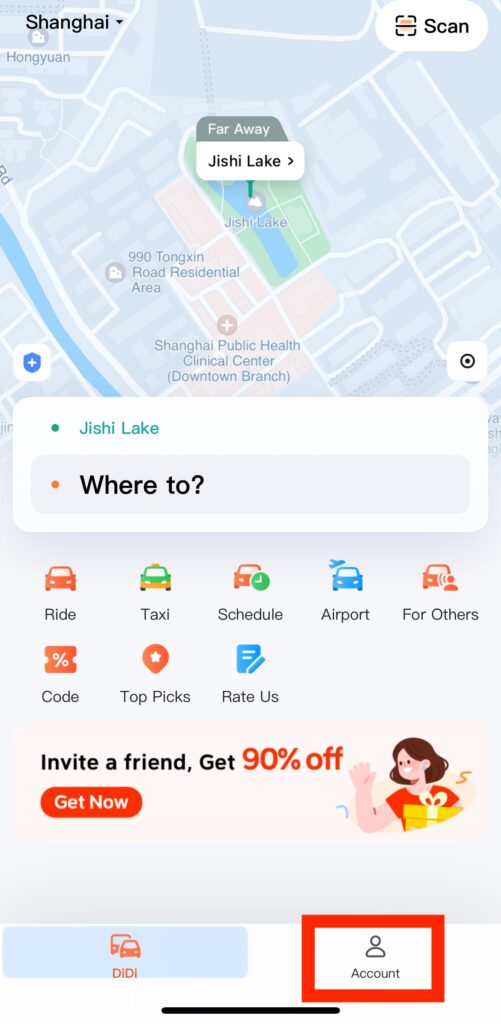
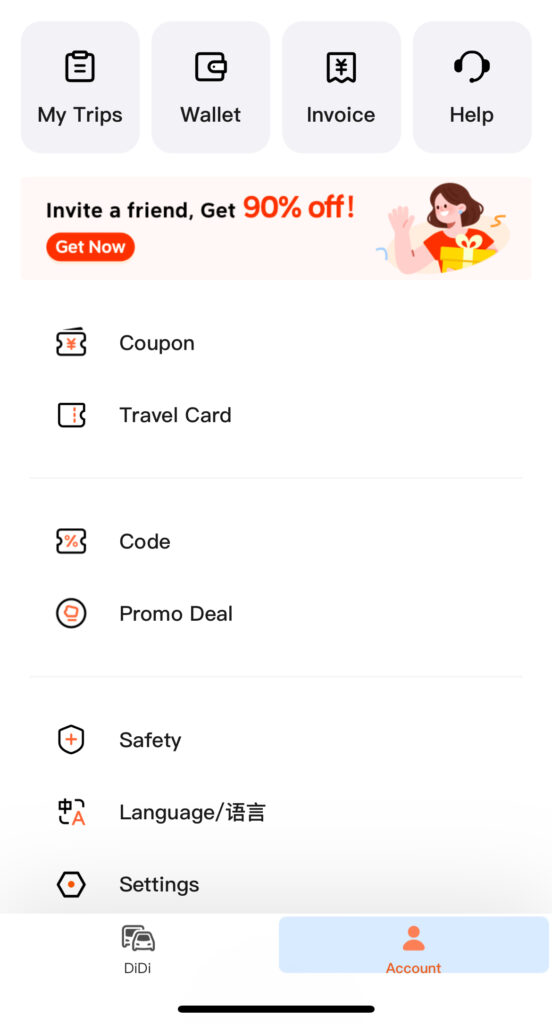
When first opening the app, allow location access and select English as the display language. Tap “Account” in the bottom right corner to begin the login process.
By default, you will be prompted to log in with your phone number. International phone numbers can be used, provided they can receive an SMS verification code.
If you already have a WeChat or Alipay account, you can also sign in via these two apps. However, there is an easier way to access Didi directly within both platforms, as we will explain below.
How do I add my payment method?
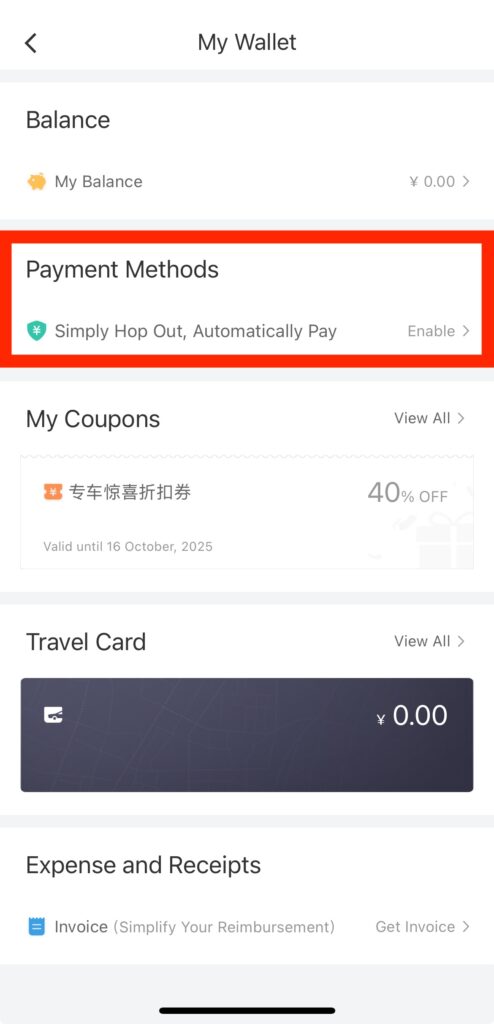
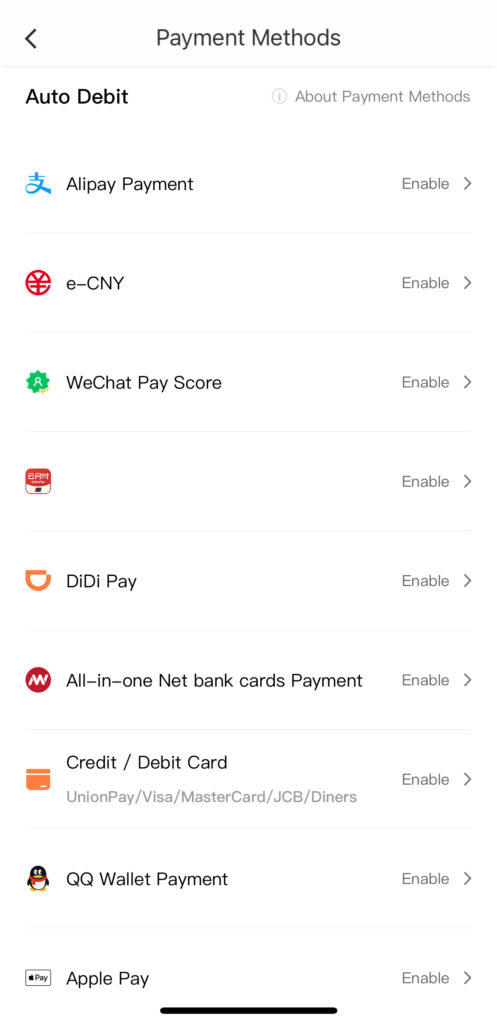
Under “Account”, tap “Wallet,” and then “Payment Methods.”
Here you will see a list of payment options, including Alipay, WeChat Pay, credit/debit card, Apple Pay, and others.
How do I book a ride?
- By default, the app will automatically detect your location for pickup. You can move the pinpoint on the screen to adjust it if needed.
- Type an accurate address for the destination. Most locations are recognized in both Chinese and English.
- Choose your ride type. Prices are shown before confirming the booking, and options range from budget (Express) to premium (Premier).
- Tap ‘Confirm’ to request a driver.
- When the vehicle arrives, check that the license plate number matches the one shown in the app.
- The driver may also ask for the last four digits of the phone number used to book the ride, usually in Chinese. It helps to have this written down in a notes app to show the driver.
Accessing Didi from Alipay/WeChat mini program (recommended)
Beyond payment, Alipay and WeChat also serve as platforms that host other Chinese apps through built-in mini programs. These mini programs, ranging from delivery services like Meituan and Eleme to local restaurant menus, allow access to many Chinese apps without needing to download them separately.
Didi is available on both platforms, but we recommend Alipay, as it does not require a Chinese phone number to use the Didi mini program.
Before starting, make sure your Alipay account is set up with your passport information and linked to a valid payment method.
How do I find the Didi mini program within Alipay?
Open Alipay, and the Didi mini program may appear on your home screen.
If not, type “Didi” in the search bar and select the mini program that appears.
The first time you open it, you may be prompted to allow location access. Choose “Allow” so the app can automatically detect your current location.
How to book a ride?
From here on, the process in Alipay is almost identical to using the Didi app — the only difference is that payment is handled directly through Alipay, as the ride will automatically charge to the Alipay account.
How do I add my payment method?
You don’t need to! The ride will automatically charge to your Alipay account. For how to set up your Alipay account, check out our latest guide.
Other FAQs
What are the ride options?
- Economy: the most affordable rides
- Standard: everyday rides
- Premium: high-end cars, top drivers
- Priority: shorter waiting time
- Comfort: cleaner and newer vehicles
- 6-Seater (or “Large Car”/van version): a vehicle that seats up to six passengers — ideal for groups or lots of luggage
- Taxi (cash accepted)
Can I add multiple stops?
Yes. When typing your destination, you can tap the + icon next to the address field to add multiple stops to a trip. This is often more cost-effective than booking several different trips.
What if I don’t speak Chinese?
The app includes a built-in translation tool that allows messages between passengers and drivers to be automatically translated, making communication straightforward even without speaking Chinese.
What if I encounter a problem?
Didi provides 24/7 in-app English customer service, accessible under Account → Help. There is also a dedicated safety hotline that can be contacted in case of an emergency.
Navigating China has never been easier, and using Didi is one of the simplest ways to travel around China’s cities. For more tips on using local apps and services during a trip, explore our latest guides on how to set up WeChat Pay.
By Olivia Zhao